
Power Platform Pipelines
Can changes in Power Automate solutions be deployed automatically? The good news is: Yes! With Power Platform Pipelines, the concept of continuous deployment has found its way into the Microsoft Power Platform. But how do Power Platform Pipelines actually work? And how are they configured? This blog article provides the answers.
The aim of the Power Platform Pipelines
Power Platform Pipelines automate the steps of exporting and importing between development, test and production environments. They can be used to quickly change solutions and transfer them to another environment in a matter of seconds.
Where can I find the feature?
The Power Platform Pipelines tool can be used in the Power Apps Admin Centre can be installed at environment level. It is located in the category Dynamics 365 Apps:
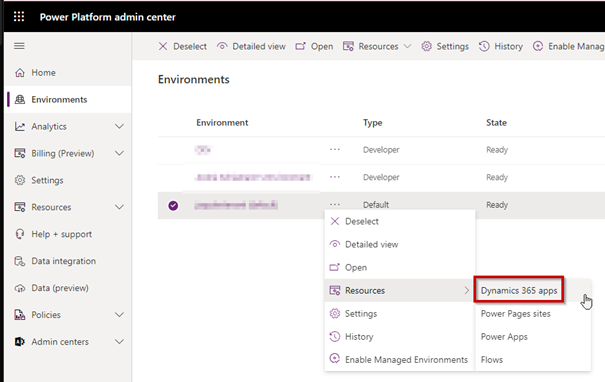
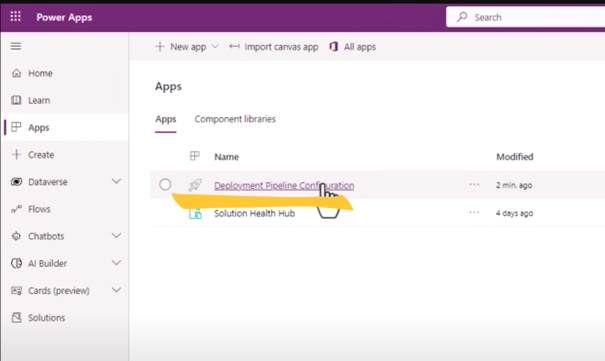
By clicking on Install App The Power Platform Pipelines feature can be selected in the ribbon. Two new entries then appear. In the Admin Centre under Apps you will now find the Deployment Pipeline Configuration. Pipelines for the environment can be created and configured here.
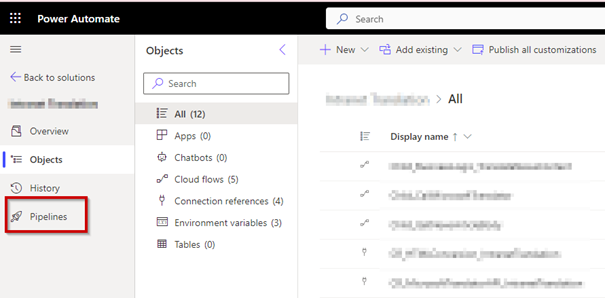
There is also a new tab in the Power Automate Solution Explorer Pipelines, which is called to trigger an already configured pipeline.
How do I configure a pipeline?
To create or configure a pipeline, you need the role of a Power Platform Administrators. There are a few requirements:
- At least three environments in the tenant must be Managed Environments be configured. This can have an impact on the licence requirements, so the concept of managed environments should be understood before environments are activated as „Managed“.
- All environments used in the pipeline must contain a Microsoft Dataverse database.
- Special „Microsoft Dataverse for Teams“ environments do not currently support pipelines.
Once these requirements have been met, a pipeline can be created. The pipeline consists of individual configuration steps in the Solution Explorer, called Deployment Stages. An example would be „Deploy to Test“, which specifies that the solution is automatically transferred from the develop environment to the test environment.
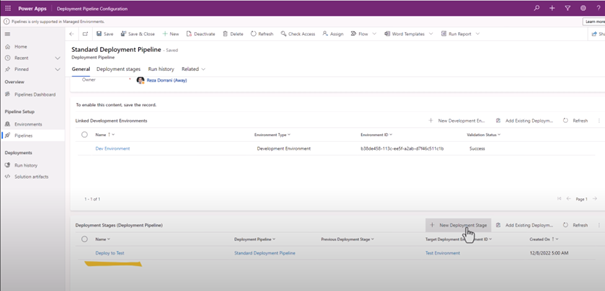
Pipelines are the centrepiece of the automated provision of solutions in the development process with Power Automate.

 Deutsch
  English (UK)
  Русский