
Staffbase
Intranet
Implementation
Implementing Staffbase with a Partner: Process, Timeline, Cost
When does a Staffbase partner pay off? The six-step process, a realistic timeline, what drives cost and five questions to ask before you hire.
JASP – yes please.JASP
JASP builds integrations and automation across sensors, networks, servers, Microsoft 365 and AI. We also build our own apps you can use right away.
For intranet, office and Microsoft 365. Each product page shows access, pricing and setup.
Room Booking, JASP Events, Calendar, Virtual Office and the Tournament Prediction Game are also available in Microsoft Teams. Staffbase plugins are coming soon. What it means for you
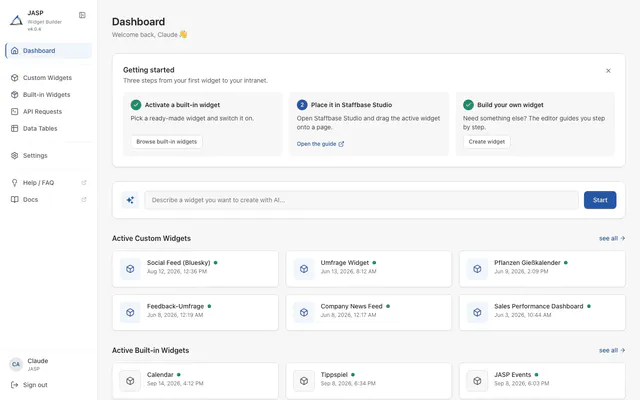
Built-in widgets for Staffbase ready to activate without code, your own widgets in HTML or with the AI editor.
from €149 net per monthFree plan available
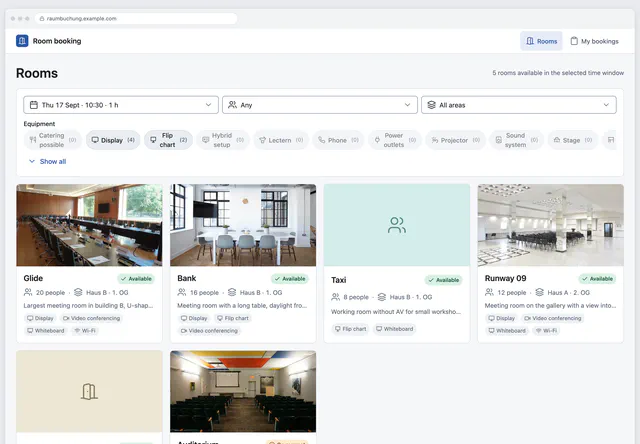
Book meeting rooms with photos, equipment and free slots, in Outlook, Staffbase or as a web app.
from €69 net per month
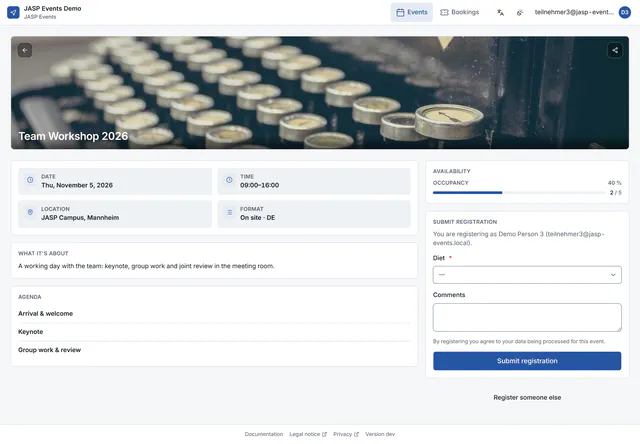
Registration with seat limit, waitlist and confirmation emails for internal events.
from €49 net per month
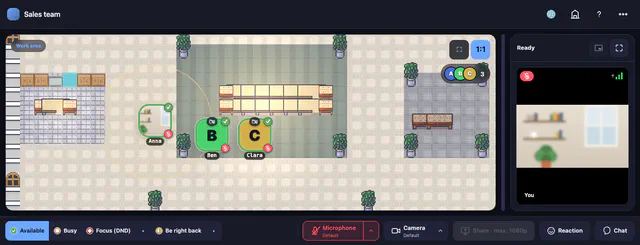
2D office in the browser with proximity audio and video for small teams.
from €15 net per room and monthFree plan available
Make Staffbase news and pages searchable in Microsoft Search and Copilot.
from €3,999 one-off, excl. VAT
Translate SharePoint pages into 70+ languages with one click.
from €3,999 one-off, excl. VAT
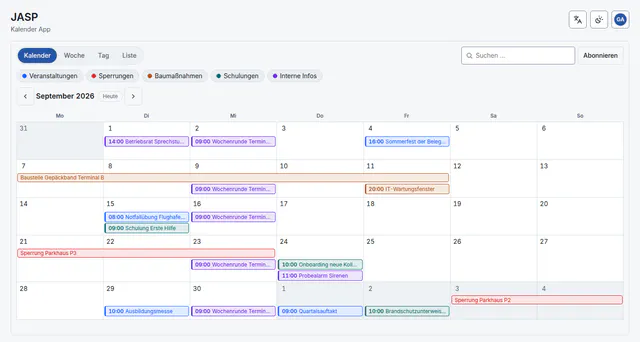
Show appointments in Staffbase by month, week, day or list and export them as .ics files.
from €29 net per month
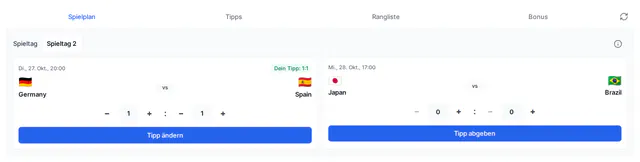
Predict match results, track your points and see who leads the leaderboard.
from €290 net per tournament
All prices excl. VAT. Details are on each product page.
Every system has its own interface. We connect them, automate the data exchange and take care of operation and changes afterwards.
Integration comes first. Microsoft 365 remains our foundation.
We connect your software through its APIs and automate the data exchange, so nobody maintains the same data twice.
Assistants that search your own documents and answer with a source. We plan data protection and works council from day one.
Home Assistant connects KNX, cameras and sensors. Automations react to measured values instead of fixed times.
UniFi networks with separate segments for cameras, guests and building systems, remote access via VPN. For sites on Starlink we plan remote access without port forwarding.
We set up servers, virtualise, back up and monitor them. We run our own apps the same way.
Microsoft 365 is our foundation for identity, collaboration and files. On top of it we build SharePoint, Teams and Staffbase solutions, with more than 20 years of Microsoft experience.
The systems from our projects, grouped by layer.*
From the first inventory to ongoing operation.
We clarify data sources, interfaces, access rights and the process that is still manual today.
We decide which system supplies which data, where it is processed and how errors become visible.
We first build one complete flow and test it against agreed cases.
After go-live we check operation, fix errors and adapt the solution when connected systems change.
What you get with us, with evidence from our work.
We know KNX, cameras, UniFi networks, servers and Microsoft 365 from our own projects. We build the interfaces between them ourselves.
Evidence: Recently: 13 cameras analysed locally in Home Assistant, in their own UniFi network segment.
We build 8 products ourselves. Our apps run on our own servers, with monitoring and a test environment.
Evidence: Room booking, JASP Events, calendar and more: all on this page with prices.
JASP since 2016, with roots back to 2009. Projects in automotive, energy, chemicals, healthcare and media.
Evidence: More than 20 years in the Microsoft ecosystem: SharePoint, Teams, Power Platform.
We build widgets and integrations for Staffbase. With our Widget Builder you activate built-in widgets without code and build your own widgets in HTML or with the AI editor.
Evidence: The M365 Search Connector brings Staffbase content into Microsoft Search and Copilot.
Anonymised, from development, operation and planning in recent months.
, Server
Our apps run on our own servers with monitoring and a test environment where automated tests run.
, AI
Finds the right part number in SharePoint manuals and parts catalogues and names document, page and link.
, IoT
Home Assistant with Frigate detects objects locally. The cameras run in their own UniFi network segment.
, IoT
A classifier checks the camera image, Home Assistant controls the gate.
, Network
Planned and documented: UniFi Protect behind a Starlink connection, without a UniFi router and without port forwarding.
, IoT
Group addresses documented, lights and sockets integrated into Home Assistant.
We share what we build and learn on LinkedIn. Follow JASP to keep up with new projects and articles.
Follow JASP on LinkedIn (opens in a new tab)The most-read articles from our magazine in the last 90 days.
Mail merge with SharePoint data: sync the Excel file from the library with OneDrive or export the list to CSV, then run the merge in Word. Step by …
Staffbase, Flip, Beekeeper, Haiilo and the SharePoint app in Teams compared: costs, hosting, Microsoft 365, works council and rollout.
Roll out Power Automate solutions between environments: managed or unmanaged, export, import with connections and environment variables, checks …
Clone Solution in Power Automate does not copy your solution: it creates a new version and merges all patches. How it differs from Clone a Patch.
Connect Staffbase with Microsoft 365: 5 integration patterns and 3 business scenarios show you when the technical effort pays off.
Insights on Microsoft 365, SharePoint, digitalization and more
When does a Staffbase partner pay off? The six-step process, a realistic timeline, what drives cost and five questions to ask before you hire.
Choosing room booking software for Outlook and Exchange: nine questions on calendar, pricing, approval, data protection and operation before you decide.
n8n-nodes-staffbase: create news posts, read channels, users and comments, start workflows from Staffbase webhooks. Three examples and installation.
Answers to the most important questions about our consulting, projects, and collaboration.
The brands named belong to their owners. Microsoft, Microsoft 365, SharePoint, Teams, Power Automate and Azure are trademarks of the Microsoft group of companies. UniFi is a trademark of Ubiquiti Inc., Proxmox® is a registered trademark of Proxmox Server Solutions GmbH, Docker is a trademark of Docker, Inc. Naming them describes what we work with; it implies no partnership or endorsement by the owners. ↩︎
Let's talk about your project – no obligation, completely free.
Free Initial Consultation