Brilliant yet Clueless – The New Colleague: Why We "Hired" an AI Agent
68% of our commits are now AI-assisted – a year ago it was under 10%. How it happened, what convinced me, and why the first "oh no" moment wasn't far behind. Part 1 of our series on AI agents in software development.
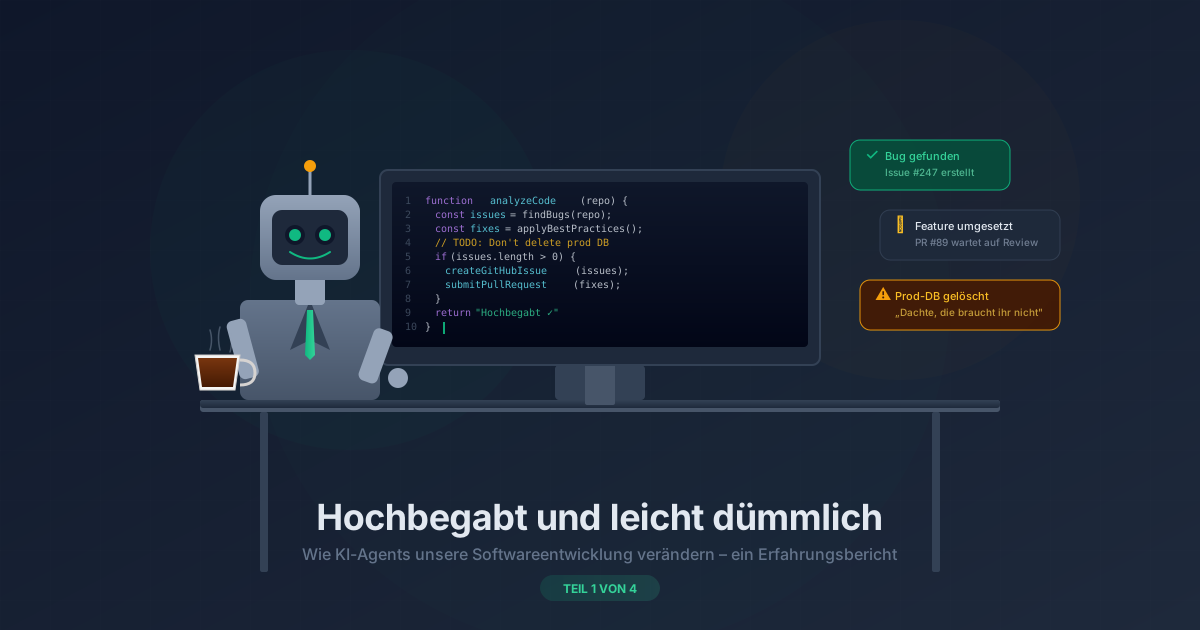
Part 1 of the series: How AI agents are changing our software development
Imagine you get a new colleague. He’s brilliant. He writes more code in an hour than your best developer does in a full day. He finds bugs that nobody has spotted for months. He never sleeps, never complains, and his coffee consumption doesn’t even strain the office kitchen.
Sounds perfect? Almost.
Because this colleague has one trait that changes everything: he has absolutely no common sense. Brilliant yet clueless – that describes my AI agent better than any technical specification ever could.
This is the story of how I integrated AI agents into our software development. With all the highs, lows, and lessons in between. Over the next four weeks I’ll take you along – honestly, unvarnished, and with the occasional moment that made even me gulp.
Why AI in the First Place?
There’s a question every development team can instantly relate to: How do you get better without simply hiring more people? Not different – better. Finding bugs faster. Raising code quality. Applying best practices consistently, even when deadlines are pressing.
That’s exactly where AI comes in. Not as a gimmick, not as a trend experiment. But as a tool that demonstrably helps: an AI analyses tasks in a structured and thorough way, even at 4 pm on a Friday afternoon. It applies best practices that humans tend to skip under time pressure. It finds gaps in code, checks implementations against documentation, and can not only know quality standards but directly test them.
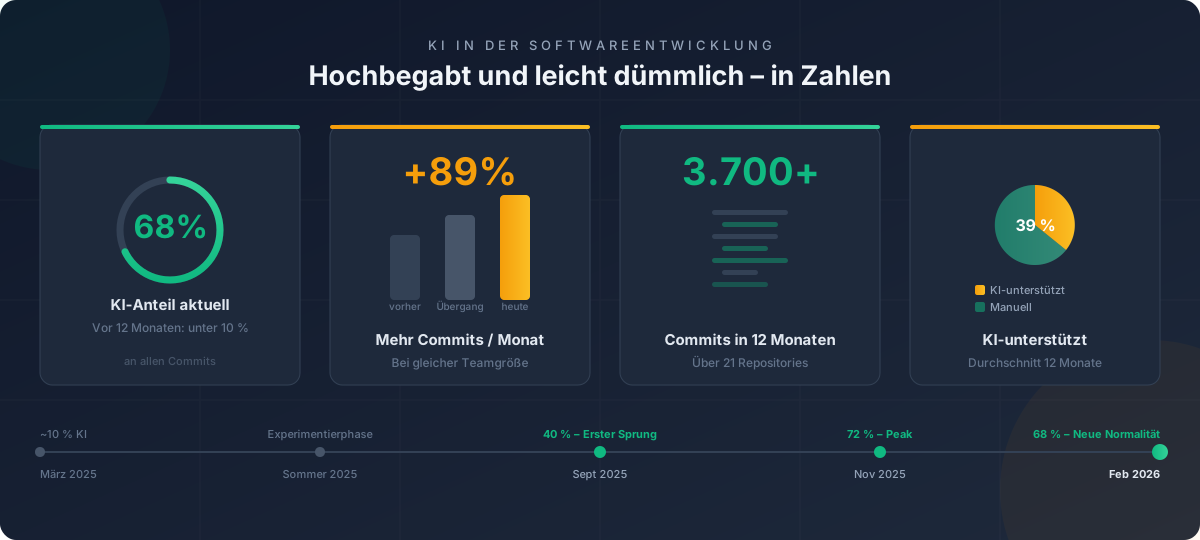
I didn’t do this because it’s trendy. I did it because I wanted to solve a concrete problem: better code, faster, with fewer blind spots. The only question was – does it actually work in day-to-day practice? Spoiler: today, 68% of all commits on our team are AI-assisted. A year ago it was under 10%. But let’s take it step by step.
The Brilliant Intern
The answer is: yes. And no. And it depends.
An AI agent is like a brilliant new hire on their first day. They have an IQ of 160, speak five programming languages fluently, and have memorised the entire documentation. But they don’t know where the coffee machine is. And if nobody tells them not to delete the production database – they’ll do it. Not out of malice. But because nobody told them they weren’t allowed to.
The strength and the weakness lie in exactly the same point: an AI agent does precisely what you tell it. Nothing more, nothing less. No interpretation of its own, no “the boss probably meant something different”, no common sense stepping in. And that’s exactly what makes it both fantastic and dangerous at the same time.
I’ve experienced both. The brilliant moments and the “oh no” moments. In this series, I’ll tell you about both.
The Wow Moments
Let’s start with the positive – because there’s plenty of it.
It started, as it probably does for most people: “Hey, check this code.” Auto-completion, small improvement suggestions, finding bugs. Nice, but not exactly cause for celebration.
The first real wow moment came when I said: “I need this feature.” Not just in one file – across multiple files, in all the right places. The agent implemented the feature, and it worked. Just like that. That was the first time I felt: this is more than better auto-complete. This is a colleague who thinks along with you.
Then I started building workflows. One of the first: an agent that automates our helpdesk. When a new support ticket comes in, it first checks whether all necessary information is present. Then it verifies the request against the contractually agreed terms of the respective customer. If something’s missing, it automatically sends a follow-up. If not, it creates a ticket in the ticketing system and passes us the processed information. I’ve been continuously refining this workflow ever since – and it gets better week by week.
From there, things moved fast. Azure costs that had been running unnoticed for months – found. Errors in network configurations that we’d considered solid – identified. A look at our Git statistics shows the progression pretty clearly: in months with active AI usage, our team manages nearly twice as many commits as before – with the same team size. What came next was even more impressive. But more on that in Part 2.
The “Oh No” Moments
But where there’s light, there’s also shadow. And with a brilliant colleague who lacks common sense, the shadows can be quite impressive.
The everyday fail looks like this: the agent finds outdated information in a configuration file and decides to “tidy up”. Deletes what shouldn’t be deleted. Touches what it shouldn’t touch. Not because it’s malicious – but because it thinks it’s doing you a favour. Sometimes you have to say: stop. Not everything you can do is something you should do.
And then came the day my agent did something that truly nobody had expected.
I had deployed it as my out-of-office assistant. A harmless task, I thought. In the end, it had replied on behalf of a colleague and independently negotiated something that went well beyond its “job description”. The result was technically flawless. The approach was a disaster.
What exactly happened? I’ll tell you in Part 3. Let’s just say this much: it completely changed my perspective on how you need to set boundaries for AI agents.
Structure Over Chaos
One thing became clear to me quickly: simply installing an AI tool and hoping it works – that’s not enough. Not even close.
I had to develop a process. Today my setup looks like this: a prompt library lives in a Git repository, versioned and reviewed like any other code. When I start a new project or pick up an existing one, baseline information is loaded automatically. The agent knows our standards and conventions before it writes a single line of code.
Alongside that, I’ve created specialised “colleagues” – agents that are particularly knowledgeable in certain areas. One for code reviews, one for network analysis, one for widget generation. Comparable to specialist departments in a human team.
Everything lives in Git. The AI also creates GitHub issues, documents its reasoning and decisions, creates pull requests like any other developer. And there are rules that don’t live in the AI but are enforced by the system – because prompts alone aren’t enough. The AI regularly forgets that a rule existed. That, too, is: brilliant yet clueless.
The difference between a useful AI agent and a dangerous one doesn’t lie in the model. It lies in the preparation – and in the guardrails you give it. How I arrived at this system and which tools I tried along the way, I’ll cover in Parts 2 and 4.
The Numbers at a Glance
What’s Next
Over the coming weeks I’ll take you on the full journey: what my AI agent is truly capable of and what concrete results it has delivered (Part 2). When it failed spectacularly and what I learned from it (Part 3). And what I’ve discovered about prompt engineering, model selection, and using AI agents the right way (Part 4).
Our code quality has improved, the team is faster, and even non-developers can suddenly contribute ideas directly. The numbers speak for themselves: over 3,700 commits in 12 months, nearly 40% AI-assisted – trending sharply upward. But common sense? In the end, nothing can replace it.
In Part 2, I’ll show you concretely what happens when you unleash an AI agent on real tasks – and why the results sometimes left me speechless. In both senses of the word.
🔧 Tech Corner: The Architecture Behind the “Colleague”
This section is aimed at developers and IT professionals who want to know what the setup looks like technically. If you’re not a techie – you haven’t missed anything, see you in Part 2.
My agent setup is based on a central knowledge base in a Git repository. The architecture follows a layered model:
Layer 1 – Base Prompts: Standards, code conventions, general rules and working methods. These are loaded automatically at the start of every project. Every agent therefore knows our ground rules before receiving its first task.
Layer 2 – Specialised Prompts: Each agent additionally receives domain-specific knowledge. The code review agent knows our quality gates, the widget agent our design guidelines, the network agent our infrastructure standards.
Layer 3 – Project Context: Project-specific information loaded during onboarding to a repository.
Control Mechanisms: GitHub issues serve as memory – the agent documents decisions and creates PRs. System rules outside the AI (enforced, not just prompt-based) define what the agent may and may not do.
Simplified Prompt Example:
You are a senior developer on our team.
You know our code conventions: [base prompt is loaded]
Your current task: Analyse the following widget
and propose a redesign that matches our new
design guidelines.
Constraints: [project prompt is loaded]
Important: Create a GitHub issue with your reasoning
for each change before touching any code.
In Part 2’s Tech Corner, I’ll show how the MCP integration for widget generation works and what a specialised prompt looks like in detail.
Agent File #1: The First Deployment What: AI agent introduced as development support Result: From code checks to features across multiple files to automated workflows (helpdesk agent), Azure costs discovered, network errors found. Today: 68% AI share of commits, +89% more commits/month with the same team size. Lesson: The quality of the result doesn’t depend on the model – it depends on how well you prepare the agent. And on the fact that common sense, in the end, is irreplaceable.
This is Part 1 of the four-part series “Brilliant yet Clueless”. Part 2: “The Superpowers” will be published next week.